Track Everything

Track Everything

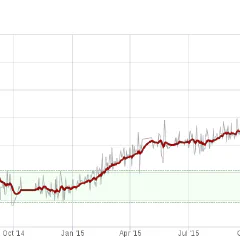
I like to track stuff. I think it has always been like this. But later I realized that this can also be useful to achieve goals and discover problems. Because we are very bad at noticing patterns over longer periods of time. We might step on the weight scale every morning and see that it varies up and down a kilogram, at least if we can remember what it said yesterday. But this is not how your weight changes, it changes very slowly over a long period of time and unless you write it down you won't notice. Writing it down is one thing, but you really only see what is going on if you visualize it with some kind of graph. As I am not only into tracking stuff, but also pretty lazy, keeping log of all kind of values would never work without the support of gadgets, mobile and web applications. So today I will list some that I am using at the moment. Habitbull Firstly HabitBull, this is the newest app I am using. It is basically a check-list of your goals or habits, that you can check off every day. It will give you some graphs and tells you if you break the chain. I use it to track my new year resolutions, but also some other habits I am trying to acquire like "use duolingo to learn Spanish every day". Duolingo has its own reminders, tracking and graphs, but it is nice to have it all in one app and to keep an overview this way. The nice feature of this app compared to others is that you can track events that should happen every day, or a number of times every month. This is what I use for blog posts and books: require one per month. You can also track habits which require a certain number per day, for example to track your weight or a number of pull-ups. I am paying for the premium version, because that one allows syncing to the cloud. It doesn't work well, but it is good enough for backups. The biggest problem with Habitbull is that it is region restricted on the Google Play Store, and they don't allow users in Spain. Luckily I was able to use my work account to download and pay for it. But I wonder why companies take these kind of rubbish decisions. resting heart rate sleep Next: fitbit, this is probably the most known and used tracking app. I bought a fitbit Charge HR specifically to track my resting heart rate. Currently I don't have enough data for comparison, but it the future it should give me an indication when I am sick or generally exhausted. I also use the device to track my sleep, which is not so important at the moment. But last year I had a phase where I was very tired for a long time and it turned out that I averaged only five hours sleep a night. And finally I also use it to track general steps and energy output when not doing sports. I try to do 12000 steps on the days when I don't use the bicycle. Nutrition: Macros Nutrition: Calories Myfitnesspal I just started using and it is probably just temporary. It is probably the best app to do food logging. Which always will be annoying as you have more or less guess the amounts and sizes of the food you are eating,, unless you just eat ready-meals, which you shouldn't. The main things I learned so far are: - snacks make 30% of my calories intake (!) - most of my calories come from carbohydrates Myfitnesspal is also very good to integrate all kind of other applications like fitbit, Strava, Withings, Google Fit, ... My current plan is to use it maybe two more months and hope to have reduced my snacking by then. To track my general weight I use a fitbit wifi scale, so I don't have to enter the values manually. As I mentioned above: tracking weight can be very difficult if you don't have good visualization. The graphs from fitbit are pretty bad as they don't have a average or trend line. Much better is trendweight, which is a free website supporting the fitbit and withings wifi scales. It has very nice graphs and tries to make predictions like "You will reach your goal weight in June 2018". The graph is only part of my history, but you can see that something happened in January 2015 (I broke my collarbone) and that 2015 generally was not very successful. These are the apps I use for general daily tracking, but there are some more specific to sports, app usage and to-do lists. But this should be enough for today.
March 31, 2016 · 4 min · Christof Damian

Yoga

As I have mentioned in my New Year Resolutions 2016 post I have started doing yoga. The main reasons for this are: The meditation part Some of the sessions are so relaxed that you fall asleep and even if your mind is racing at the beginning of a practice, after a few minutes you get distracted by doing stuff. In that aspect it is like cycling for me, getting out of your head and into your body. Breathing exercises are a big part of this. The stretching bit Yoga is mostly about getting into positions your body doesn’t want to be in. At least my body doesn’t want to be twisted like that. Sitting on my desk most of the day and then sitting on the bicycle a bit more has resulted in myself being very inflexible. The result of this is a bad back and problems with all kind of joints. I did some physiotherapy for my back a long time ago and when I broke my collarbone. The exercises are very similar to some yoga poses. So I am just going to pretend that they work. The workout stuff This I just discovered after a few practices. Apparently I should have some muscles I didn’t know about. I am mostly talking about the mystical core one hears about so much. Disclaimer: I am the first to admit that I was not a big fan of yoga. I saw it as something people do that don’t want to do a proper sport and can be done lying down. And it isn’t about yoga, you can have the same result with other sports. But the Kata style helps, it gives you a pattern to adhere to. So how did I start? On YouTube obviously. Because I am not quite up to embarrassing myself in front of a group of pros. One of the cycling channels I am subscribed to had some Yoga For Cyclists videos and it is a good starting point. It also helps that it shows a few inflexible guys in sweatpants trying to keep up with a yoga teacher. ...

February 3, 2016 · 3 min · Christof Damian
New Year Resolutions 2016

New Year Resolutions 2016

It's that time of the year, when everyone makes empty promises to themselves. And I don't want to skip this important tradition. The last one I did was in 2012, which seems like a long time ago. Usually these are along the lines of sporty stuff or loosing weight. I have already stopped drinking alcohol and coffee end of last year and I am doing two hours of activity (as tracked by google fit) already. And nobody will stop me cycling too much anyway. There are also some things I promise I won't do this year: going vegan, stop gluten intake or low-carb. Still, some of these might be unexpected. ...

January 4, 2016 · 3 min · Christof Damian

Bloomsky Review Update: Much better

In September I published a review of the Bloomsky Weather Station, which I summarized with “a nice toy with brilliant hardware and rubbish software.”. My main complaint was that it was impossible to share an URL of the station and to get to the data, photos and images in any way. Today all of this has changed. Now there is a map with all the stations, and each station has it’s own URL like mine for example. It includes the current data and webcam image and last timelapse. This will already make most people happy, but they didn’t stop there. Now every user has his own private dashboard with access to previous timelapses and historical data. historical data The historical data gives you nice graphs for the available period and also has a table view with the detailed information. The feedback of the graphs can be a bit slow especially if you choose a large time span, but it does look really pretty and gives you a quick overview about the weather changes in a longer time frame. timelapses The timelapses view is straight forward, you can see a calendar with the available timelapses and you can download the one from the selected date. No bulk download yet as far as I can see. ...

December 31, 2015 · 2 min · Christof Damian
Bloomsky Review

Bloomsky Review

UPDATE: I posted a followup to this, with information about the new software and API and now highly recommend the Bloomsky Station The Bloomsky “Weather Camera” is a weather station with built-in camera. I first saw it on a Kickstarter Campaign, which was pretty successful. I snapped one of the early birds deals and later added a solar panel. Expected delivery was December 2014 (ha!), it turned up in August 2015. But this is already better than some other campaigns. They had some problems to get the CE approval for Europe, so that explained some of the delay. It is advertised as “5-in-1 weather station + HD camera that captures real-time weather data + sky image at your location. Next Generation Weather Network.”. ...

September 12, 2015 · 3 min · Christof Damian