Tumi Alpha International Wheeled Office Review

Tumi Alpha International Wheeled Office Review

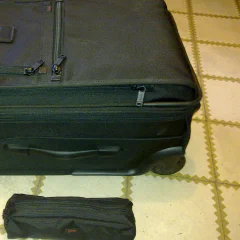
International Wheeled Office with cable pouch To go with my new Lenovo T510 I now also bought a carry-on with space for the laptop. As it goes with purchases like this I spend a lot of time researching them on the net, it just seems to be the German or nerd to do. Also quite typical for a German is to choose something which is of better quality than you need, but also not the most expensive one out there. Other bags I considered where by Rimowa, Victorinox, Samsonite and Briggs & Riley. The reason why I am writing about this at all is that the Tumi website doesn't include the information I needed and there seems to be a lack of information about this bag on the, so this is more about the facts as an actual review. Size: height: 54.6 cm, width: 37.5 cm, depth: 25 cm ( compressed ), 28 cm ( normal ), 32 cm ( expanded ) Weight: 5kg ( including cable pouch, lock and bits and pieces ) The size and weight might be a problem if you want to use it as a carry-on, because some airlines are annoyingly strict with there size and weight restrictions. Some have a 20cm depth limit or a 8kg weight limit. Easyjet and BA are probably OK, Germanwings and Ryanair maybe not so (but you shouldn't use Ryanair anyway). The protected laptop compartment fits the T510, but the laptop is a bit wide which makes it a tight fit. Using the 9 cell battery is not a problem. A 15" Macbook Pro should fit without problems. If you decide to buy it, try to get it from the US as the prices are tumi.com: $695 (528€) , tumi.de: 725€, uk.tumi.com: £695 (818€). Review: it is quite nice If you need any other details or measurements, give me a shout with a comment.

December 19, 2010 · 2 min · Christof Damian

Why I am deactivating my facebook account

I have decided to deactivate my facebook account. It isn’t done yet, so this message gets through and I am also waiting for the download of my information. The reason is not a concern about privacy. I am sure that facebook is doing all kind of evil stuff with the information I provide them, but my guess most of this is used to present me with ads to make some money for them. I think that facebook is probably the site with the best privacy settings out there. Every other site I am using from small forums over job sites to other network sites like xing or linkedin, doesn’t provide anywhere near the privacy options that facebook provides. And none of them in under the scrutiny that facebook has to face all the time. The reason why I would like to stay is that facebook is the best way to keep in touch with people from my previous live in Germany and London, some of who are all over the world now and I will loose any contact to them without facebook. And facebook is the best casual photo sharing site out there, the people tagging works very well and because a lot of people are on facebook the like/comment bit is brilliant. No, the reason why I leave facebook is that it is a big time waster. I spend most of the time scrolling to rubbish game notifications, switching the time line back from “magic” to “most-recent”. People are starting to send me facebook messages instead of proper emails. And there are no useful RSS feeds for the news feeds, photos or anything else. For everything else I do on the web I use three applications: gmail, google reader and pidgin. So any information I receive has to be provided as email, RSS feed or jabber. The are additional requirements: the RSS feed has to include all (or most) of the content and there is a limit to the amount of rubbish/spam/4sq I am willing to tolerate. (this disqualifies xing too by the way). So: good bye (facebook allows to just deactivate the account, which is also a nice feature if something changes and I decide to come back) update: in case you want to stay in contact with me find some options here: about me or follow this blog

December 18, 2010 · 2 min · Christof Damian

Fedora 14 on a Lenovo Thinkpad T510

by Jemimus, on Flickr Another brand new toy. After my last trip to the UK for bikesoup I decided that it was about time to get a proper laptop. So far I only have a netbook, which is very convenient when size and weight matter. But for getting work done it is just to small, the main problem is the screen size and resolution. I had a look around for good full sized laptops and the only brands producing something with the quality I had in mind were Apple and Lenovo. The advantages of the Apple over Lenovo are better built quality, battery life and easy to buy locally. I choose the Lenovo, because you can order it with more gadgets, swappable batteries and mostly because it isn't an Apple as I despise where the company is going and I already had bad experiences with Linux and iPods. This is the configuration I finally got. Intel Core i7-620M 15.6" FHD Display 1920x1080 4 GB UltraNav (TrackPoint and TouchPad) with Fingerprint Reader 500 GB Hard Disk Drive, 7200rpm Intel Centrino Ultimate-N 6300 (3x3 AGN) Integrated Mobile Broadband (Gobi 2000 3G with GPS) First thing I did was to install Fedora 14 on it. I used the install option to shrink the Windows partition to 50G and used the rest for Linux. I am probably going to replace the hard-disk with a SSD in the future, but it was a bit too expensive for now. The install was amazingly boring. I was expecting all kind of problems with the hardware, but everything just worked. Even the fingerprint reader allows you to login after configuring it with a nice tool. The only tweaks I needed so far, are these: The UMTS card needs a firmware and loader, I used these instructions from the CentOS list. I don't really need it, because mobile broadband via bluetooth is also very easy to set up and works just as fast. I haven't tried the GPS yet, but I seem to be inside of buildings most of the time anyway if you enable VT-D (whatever that is) in the BIOS, hibernate / suspend to disk won't work for some reason some of the preferences don't work for the touchpad, but you can enable those and more with the synclient tool. For example "synclient VertTwoFingerScroll=1" Battery time is a bit disappointing, with either a 6 or 9 cell battery. Some of it seems to be the fault of the Linux software, but PC hardware always seems to be rubbish in that department. The build quality is also not on the level of a MacBook pro, but much better than any Dell, Asus or whatever they are called. I will comment on this post in case I make any new discoveries.

November 28, 2010 · 3 min · Christof Damian

Kindle and ebooks

I was planning to buy an ebook reader for a while. I mean it is 2010 and if we don’t have flying cars at least everyone should have a robot and not read from dead trees. It took me a while because I wasn’t able to decide on a brand and when I decided on Amazon I couldn’t decide on which Kindle to get. My girlfriend took the decision off me by giving me a Kindle 3G+Wifi for my birthday. So here is a quick review. Once you open the packaging you already notice the difference to any other display device you have ever used. The screen already shows something, even though the device is switched off. In this case it shows the instructions to switch it on and plug it in. Whenever the device is switched off it displays a random picture. The Kindle is about the size of a normal paperback novel, it is not too heavy and it is very easy to hold with one hand. The large “turn page”-button on both sides of the screen allow reading without moving your hands. With the the 3G or Wifi you can access the Amazon store, which allows you to buy books or directly download one of the many free books from Amazon. Once you try this you might notice one of the disadvantages: a lot of books are not available for European buyers, this even includes some of the free books. The free books seem mostly be from project gutenberg, so I don’t understand the reasoning for this. You can just download them from there. A lot of paper books, especially older ones are not available at all. So first thing I bought The Ultimate Hitchhiker’s Guide to the Galaxy obviously. But I know that one already, so I also bought The Last Run: A Queen & Country Novel, which is a kind of James Bond story with a British female agent and the last art of a series which I already followed. The book cost me $18.74, and there is already the first problem, I think it is too much. It does cost less for US customers and the hardcover is only $17.16. Now everyone is saying that it isn’t the paper that is making the price, but something is clearly wrong here. With an Amazon ebook I am also loosing my right to lend the book to other people or to sell it again once I read it, there should be some compensation for this. The reading experience on the other hand was very nice. I also had the feeling that I read quicker on the reader compared to a paper book, maybe because of the smaller page size or the quicker page turns. This is was the Kindle is made for, reading novels is a very nice experience. Now the bad stuff: reading pdfs or technical books on the 6" Kindle is not nice, it is just too small. The lack of colour is also a problem for these and comics. The organization of books on the Kindle sucks, there should be a view with the book covers (which are also not always provided by the books), the collection system is also rubbish. Navigation is also clumsy, a touch screen would be the obvious solution but this adds weight, size, reduces battery live and quality of the display. But even without touch this could be a lot smoother. And finally: how can Amazon with one of the best, if not the best on-line shop produce a shop on the kindle that is so useless. Unless you are not near a computer it is always easier to switch on your desktop and do the shopping on amazon.com and then send it to the Kindle. Heck, even if you are not around a computer it might be faster to take a cab to the next internet cafe and do the shopping there. To summarize: I am happy with the device for the reading I use it for. I am also glad that I don’t have carry around kilos of books the next time I read the Hitchhiker, Red/Green/Blue Mars or Lord of the Rings again. And the project gutenberg is finally useful to me too, with lots of classics and older books like the Origin of Species available for free. And in the future I will get another ereader for PDFs, technical books and comics. But only if available with a colour display in the same quality as the Kindle
November 13, 2010 · 4 min · Christof Damian
git workflow for the bikesoup project

git workflow for the bikesoup project

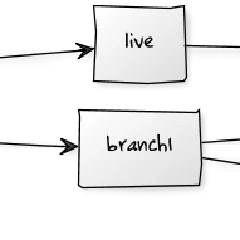
I have been one of the many converts to git and try to use it whenever possible. So far this has been mostly for smaller project, open source projects, Fedora and a little bit at work. bikesoup is my first bigger project using git. I started with initial development on the master branch and created feature branches which got merged back into master. Before going live for the first time I created a live branch. This is pretty much what you would do in subversion too, maybe with the exception of any feature branches. Once the site went live I created a feature branch off master for each issue in bugzilla I am currently working on. When I am happy with the fix I merge it back into it. And when the feature goes live it the feature branch is also merged into live. The diagram below shows this process. ...

October 2, 2010 · 3 min · Christof Damian