#12in23 and Advent of Code 2023

#12in23 and Advent of Code 2023

Last year I did have too much time on my hand, and while I spent a lot of time chilling, I did miss using my brain at least a little. So I worked on these two challenges. Exercism #12in23 I am a big fan of exercism, which is a site with exercises to learn all kinds of programming languages. The quality of the tracks varies a lot, nonetheless the most popular ones are very useful. There is also a mentoring element, which I haven't used myself. ...

January 8, 2024 · 3 min · Christof Damian
My Workspace

My Workspace

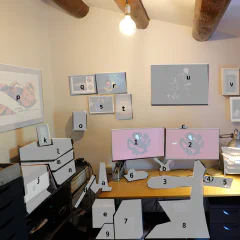
I like looking at pictures of other people's office set-ups. With most people working from home at the moment you see more and more nice workspaces especially tuned for video conferencing. I was lucky enough to have a space and a reasonable set-up already. By chance I also had ordered bits and pieces before everything was sold out on Amazon. There are a few things I still want to improve. The light is not ideal for video conferencing and I am also going to try a separate microphone for better sound. DeskMy basic desk set-up is always the same. This is the first time I have two big screens, but I always have the same keyboard, headphones and mouse. I think this goes back to at least 2000. In our currently closed office I have the same again and when I start a new job I usually bring the devices with me as not every company lets you freely choose. The computer is always running the current version of Fedora Linux, often upgraded over many years. 1. Dell Monitor U2719DC UltraSharp. I really just wanted one of these as I still had another very old monitor. This one came with a pixel error and Amazon send a replacement, but never managed to get the pick-up of the broken one sorted. So now I have two and use the one with the broken pixel for the not important stuff, like Slack. I think the broken pixel is not even a broken pixel, but an insect stuck between the layers - a real bug. 2. Dell Monitor U2719DC UltraSharp - the nice one, which has my browser, shell and Emacs. 3. Microsoft Natural Ergonomic Keyboard 4000 GB layout - while I am always looking for new fancy hacker keyboards I have stuck with this one. I have another one in storage in case this one breaks. 4. Logitech Mouse G502 Hero - my mice and keyboard are always wired, which limits choice a bit. I have pretty big hands and like a mouse that fills them. 5. Logitech Mousepad G440 - matchy-matchy with the mouse. I could do with a smaller one, because of the hight DPI of the mouse. 6. Sony Headphones MDR-1RBT - I am a bit addicted to headphones. I have three different Sony MDR-1 versions (RBT, ABT and R). I love the fit and sound. 7. PC AMD Ryzen 7 3700X, 32GB, 1TB, build up recently, also has a cheap fanless graphics card 8. Chair - from my first job/start-up, still works 9. APC BX1400U-GR Back-UPS BX, power outages and brownouts are quite common in Spain and even more so in the countryside. This protects the computer, there is another one for the routers and NAS. a. Fleximounts F6 monitor arm for laptop - it works, not a lot of movement b. Fleximounts F6D monitor arms for screens - same for two devices c. Logitech C920 HD Pro - I am lucky I ordered this in time, it works, I probably won't upgrade any time soon. The Logitech Brio is also silly expensive. SupportNot directly related to work, but supporting the main computer. d. Thinkpad T430s on a arm and T470s on the floor - laptops from work, I use them in the office and here when I need another small screen or different device. One of them also has Windows on a partition for devices that require Windows for firmware upgrades e. AmazonBasics paper shredder - goes together with the messy GTD stack on my desk, everything that I don't file goes into this one. f. Synology DS218+ - backup of the computer, Syncthing backup, all my music and films. g. USB Charging station (with Raspbery Pi running Syncthing on top), with various USB-A, micro-usb, and USB-C connectors and one for Garmin watches h. Rubbish router from provider i. AmpliFi HD Router - super simple set-up, annoyingly only with a mobile, supports multiple mesh repeaters that are all over the house j. HP OfficeJet Pro 9010 - maybe I should have gone for a laser? I don't really print a lot k. Thermometer / Barometer - it is way too hot in my office SoundI like my old school Hi-Fi components. If I had unlimited money I would just be buying this stuff on ebay the whole day. The combination of the Sony amplifier and JBL speakers gives a sound I love. The amplifier is also connected to a Chromecast Audio for multiroom sound, computer and headphones. l. Tape deck Sony TC-K790ES - needs some work, the rubber transport bands disintegrated and need replacement, which is a bit tricky m. Tuner Sony SA3ES - I never use it, but it is pretty! n. Amplifier Sony TA-542E - this must be pretty old too, still works fine o. JBL Control 1 Pro speakers - come with mounts for the wall and look sleek Art & MemoriesSince we bought the house and I have no further move is planned I made some effort to finally put all kind of stuff on the wall. p. Sven Vaeth & Paul Cooper flyer 17-7-93 Warehouse Cologne q. Photo from the Space Shuttle signed by Astronaut Robert Crippen r. family s. My dad and myself on our last holiday together. I have no idea why we shake hands. t. family u. X-Ray Cyclist by Nick Veasey sold by IKEA. Nick is one of my favourite artists and this is the cheapest way to get a great quality print. v. Newton MessagePad 130 - I really did use this back in the days. It is a bit bulky. w. Palm V, Palm Tungsten T, Ericsson t39 with extra antenna and calculator from school - this was my "smartphone" back in the days when phones got smaller every year. I sometimes connected it with bluetooth to the Palm for connectivity on the go. I miss small phones. x. random memories box: old business cards, passport, party flyer, motorcycle key y. Curves Calendar - don't google that. It has photos of mountain roads for each month to remind me of cycling. I just get a new one every year and replace it.
July 27, 2020 · 5 min · Christof Damian

Lead Dev Live 2020

I heard of the Lead Dev conference series some time at the end of the last year. There are not many conferences that focus on engineering leaders, most of the technology conferences are focused on specific technologies, methodologies or the business side. It was too late for the Berlin 2019 conference, so I set my eyes on either the London or Berlin 2020 conference. In the end I decided against London, because I wanted to avoid short plane trips as much as possible and staying longer in London also wasn’t an option. Then the COVID-19 thing happened and Lead Dev organisers decided to cancel or postpone some of the 2020 conferences and also offer an online conference: Lead Dev Live 2020. It was a two day conference on April 7 and 8, 2020. Not only was it streamed live, but also completely free. Each day had a single track happening in the afternoon and evening CEST. Streaming was via one long YouTube stream for each day, which was well produced except for some technical issues that were quickly resolved. In parallel to this everybody had access to a Slack community for general chat, topic specific channels and networking. In the end I didn’t watch all of the talks, but most of them. I am just going to list the ones I recommend to watch if you get the chance. Overall I enjoyed the experience, they had some great speakers and some topics I can directly relate to. I noticed that I found the panels more difficult to follow, you get a lot of whitespace between the speakers and there is no consistent story. This makes it easy to lose concentration, check your messages or fetch a new cup of tea. A normal talk with a story and possibly slides can really grab your attention and take you on a journey. One thing that didn’t work at all for me were the Slack channels running in parallel to the talks. The main #leaddev-live channel was very noisy and just flooded with people just saying hello. Any announcements flew past so fast that it was pretty much unusable. Something like a channel only for announcements would have been more useful. You also run very quickly into the usual Slack problem of having too many channels and then too many notifications. I definitely would join another conference by Lead Dev. I might even pay for it. Would I go to a real Lead Dev conference? Yes, but only if it is close to me. I wouldn’t spend the time and money required to travel further than maybe a two hour flight. Day 1 The first day was focused on the effects of COVID-19 on management and remote work. YouTube stream day 1 Leading teams through times of uncertainty and upheaval [Panel] Camille Fournier, Lara Hogan, Rachana Kumar and Christian McCarrick https://youtu.be/yxiDblyYkrI Good insight into how different companies and engineering approach the crisis with some well known guests. Minimum Viable Business Continuity Management Meri Williams https://youtu.be/TCu0gJ_hLq8 Talking about all kinds of aspects of continuity management. From risk assessment, testing, planning and communication. Avoiding the pitfalls of rebuilding software [Panel] Dan Berry, Jai Chakrabarti, Bryan Liles and Erica Stanley https://youtu.be/lsgbGRkysJE Rebuild or refactor in many words. Day 2 The second day was more of a mix of different topics. YouTube stream day 2 Tradeoffs on the road to Observability Liz Fong-Jones https://youtu.be/wkXKbC1GWIM Keep SRE and observability boring. Use the tools that you can easily obtain instead of reinventing the wheel. Designing effective OKRs [Panel] Aniela Crisan, Whitney O'Banner, Antonio Verardi and Heidi Waterhouse https://youtu.be/tBchi7FzRFU Panel about OKRs in general and in tech teams. I really enjoyed Whitney’s take on this. Her talk from 2019 “Setting Objectives and Key Results in your team” is also worth a watch. Another related talk watching from 2018, which was also played during one of the technical glitches in this conference is “Goal-Setting Workshops for Managers” by Melinda Seckington. Apps, stacks, and frameworks: avoiding “Shiny Object” syndrome Angel Rivera https://youtu.be/Zk9Rg0Hswu0 This talk was quite random, but still interesting. He talked about his experience of using a new shiny technology (MongoDB) without having any expertise in this himself or in the team. Risky business: taking risks in production Matthew Hawthorne and Leemay Nassery https://youtu.be/Np8NFmjLn4Q How to manage risk by using a/b tests, metrics, testing, … Building and conveying vision [Panel] Neha Batra, Lawrence Bruhmuller, Kevin Goldsmith and Maria Gutierrez https://youtu.be/I9-_4WYUEhE How to create and convey a message to your team.

April 14, 2020 · 4 min · Christof Damian
Letting your CEO deploy to production

Letting your CEO deploy to production

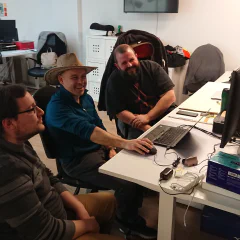
"One click" deploy (*) Recently our CEO Raj Kumar spent a week in our Barcelona office where the majority of our engineering department is located. I was working on some ideas for him to meet the team and get some insights into our daily work. While most of the company is aware of UI/UX and front-end changes we are doing to our site, some of the back-end and infrastructure work can seem like black magic. I think it is important to take every opportunity to bring this output closer to the rest of the company and especially the leadership. By chance I watched the very good presentation “Getting Real about Managing up” by Kellan Elliott-McCrea, which contains as one example the idea of letting your CEO deploy to production. One of the goals of our engineering team is continuous deployment. I set this out when I joined Devex to give us a far goal to aim for. I was inspired by Etsy’s Code as Craft blog and the book “Web Operations”. For me the important part was not continuous deployment itself, but all the changes in engineering culture required to achieve it. You need a good technical base from unit to integration tests, infrastructure as a code, continuous integration and a infrastructure team that is working side by side with the developers. At the beginning this seemed to be an impossible task, QA and deployment were completely manual, there was no unit testing, no code reviews, a clear separation between developers and operations. The code itself was a mess too, with lots of moving parts, outdated libraries and no easy way to introduce testing. But we slowly made progress, simplified the system and slowly worked our way up from deploying once in a blue moon, to once, then twice a week. Currently we are at one deploy a day, with some manual involvement of QA. The deployment gets kicked off by a chatbot and is well documented in our engineering handbook. The short version looks like this: Check QA status Tell the chatbot to deploy Check the metrics Everybody in the engineering team is already in the rotation of deploys and it is easy enough for everyone in the company to do it. Our CEO Raj Kumar was happy to do it and sat together with our two infrastructure engineers to help him along. Because there are some permission requirements it was also easier to do it from the workstation of our lead engineer. After some hiccups in QA the progress went smoothly and we had a new release in production. I guess in the end he was surprised how boring it turned out to be. Which a deploy should be. btw: we are hiring: Check out our current open positions *) the hat is part of the deploy protocol and not a fashion statement

March 27, 2020 · 3 min · Christof Damian
Saying goodbye to some legacy code

Saying goodbye to some legacy code

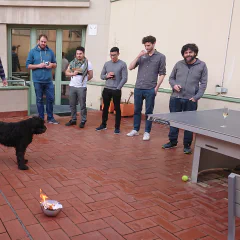
When I joined Devex a bit more than six years ago most of the code base was in one large monolith. This monolith was based on Ruby On Rails and was responsible for delivering devex.com. urn This part was called "neo". I guess because it was a rewrite of a previous Java version. I am not sure if it was a reference to Matrix or the Greek meaning. There were already some initiatives in place rewriting parts of it in different services, but the monolith was always looming in the background. Any changes to it required increasing amount of work. It was like someone tried to put the definition of technical code into code. I generally against rewrites, they tend to last for years and you loose a lot of knowledge that is baked into the original. I also have nothing against Monoliths. So I tried refreshing the code base by upgrading the dependencies, getting the few tests to run and making local development easier with Vagrant. I realized fairly early that this was not going to work. So we went with a gradual rewrite. Whenever we worked on part of the site we migrated it to our new architecture (Also a Monolith or at least a Duolith). Now six years later we finally switched off the remainders of "neo" and I thought we should celebrate in style. Legacy code is after all something that successfully supported you for a long time and enabled you to start with something fresh. Devex wouldn't be were we are without "neo". Cremation - ignore the dog So we staged a proper funeral, where everybody who wanted said some words. We also collected printouts of the most annoying bits of code, some very dated looking screenshots and some email and chat conversations from the very beginning. This was my eulogy: Today we say goodbye to maybe the best known system at Devex.+ Neo - from Greek meaning young or new, which he was neither. Or from the Matrix character, handsome, powerful and agile, which he was also not. We all have memories of him that will stay with us for a long time. We laughed about his quirks. He had amazing depths, which brought us sometimes close to tears trying to understand him. His heritage will live forever in our data structures. Finally we burned the printouts, collected them in an urn (aka hummus glass) and cheered with Cava while chatting about the "good" old days. I hope you can give your legacy code also the sendoff they deserve. The End Update (March 2020) We got a present from our CEO while he was visiting the Barcelona Devex office this week.... RIP Neo Mug

January 28, 2020 · 3 min · Christof Damian