Sharing a monitor between Linux & Mac

Sharing a monitor between Linux & Mac

For my new job, I (annoyingly) have to use a silly MacBook. For everything else, I have a nice, beautiful desktop running Fedora. I looked into KVMs to share my monitor and keyboard between the two computers, but couldn't really find something reasonably priced and functional. Synergy/Barrier/InputLeap for keyboard sharing I have used Synergy before to share keyboard and mouse between Linux computers, and this was already a good step. There is a fork for Synergy on Linux called Barrier, which now has been forked again to InputLeap. Now the maintained version is Deskflow. It also allows copy & paste between systems. ...

April 4, 2024 · 2 min · Christof Damian
My Workspace

My Workspace

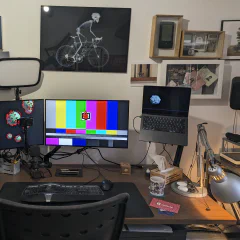
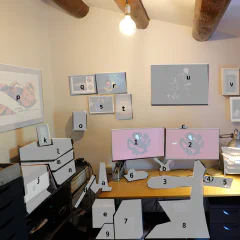
I like looking at pictures of other people's office set-ups. With most people working from home at the moment you see more and more nice workspaces especially tuned for video conferencing. I was lucky enough to have a space and a reasonable set-up already. By chance I also had ordered bits and pieces before everything was sold out on Amazon. There are a few things I still want to improve. The light is not ideal for video conferencing and I am also going to try a separate microphone for better sound. DeskMy basic desk set-up is always the same. This is the first time I have two big screens, but I always have the same keyboard, headphones and mouse. I think this goes back to at least 2000. In our currently closed office I have the same again and when I start a new job I usually bring the devices with me as not every company lets you freely choose. The computer is always running the current version of Fedora Linux, often upgraded over many years. 1. Dell Monitor U2719DC UltraSharp. I really just wanted one of these as I still had another very old monitor. This one came with a pixel error and Amazon send a replacement, but never managed to get the pick-up of the broken one sorted. So now I have two and use the one with the broken pixel for the not important stuff, like Slack. I think the broken pixel is not even a broken pixel, but an insect stuck between the layers - a real bug. 2. Dell Monitor U2719DC UltraSharp - the nice one, which has my browser, shell and Emacs. 3. Microsoft Natural Ergonomic Keyboard 4000 GB layout - while I am always looking for new fancy hacker keyboards I have stuck with this one. I have another one in storage in case this one breaks. 4. Logitech Mouse G502 Hero - my mice and keyboard are always wired, which limits choice a bit. I have pretty big hands and like a mouse that fills them. 5. Logitech Mousepad G440 - matchy-matchy with the mouse. I could do with a smaller one, because of the hight DPI of the mouse. 6. Sony Headphones MDR-1RBT - I am a bit addicted to headphones. I have three different Sony MDR-1 versions (RBT, ABT and R). I love the fit and sound. 7. PC AMD Ryzen 7 3700X, 32GB, 1TB, build up recently, also has a cheap fanless graphics card 8. Chair - from my first job/start-up, still works 9. APC BX1400U-GR Back-UPS BX, power outages and brownouts are quite common in Spain and even more so in the countryside. This protects the computer, there is another one for the routers and NAS. a. Fleximounts F6 monitor arm for laptop - it works, not a lot of movement b. Fleximounts F6D monitor arms for screens - same for two devices c. Logitech C920 HD Pro - I am lucky I ordered this in time, it works, I probably won't upgrade any time soon. The Logitech Brio is also silly expensive. SupportNot directly related to work, but supporting the main computer. d. Thinkpad T430s on a arm and T470s on the floor - laptops from work, I use them in the office and here when I need another small screen or different device. One of them also has Windows on a partition for devices that require Windows for firmware upgrades e. AmazonBasics paper shredder - goes together with the messy GTD stack on my desk, everything that I don't file goes into this one. f. Synology DS218+ - backup of the computer, Syncthing backup, all my music and films. g. USB Charging station (with Raspbery Pi running Syncthing on top), with various USB-A, micro-usb, and USB-C connectors and one for Garmin watches h. Rubbish router from provider i. AmpliFi HD Router - super simple set-up, annoyingly only with a mobile, supports multiple mesh repeaters that are all over the house j. HP OfficeJet Pro 9010 - maybe I should have gone for a laser? I don't really print a lot k. Thermometer / Barometer - it is way too hot in my office SoundI like my old school Hi-Fi components. If I had unlimited money I would just be buying this stuff on ebay the whole day. The combination of the Sony amplifier and JBL speakers gives a sound I love. The amplifier is also connected to a Chromecast Audio for multiroom sound, computer and headphones. l. Tape deck Sony TC-K790ES - needs some work, the rubber transport bands disintegrated and need replacement, which is a bit tricky m. Tuner Sony SA3ES - I never use it, but it is pretty! n. Amplifier Sony TA-542E - this must be pretty old too, still works fine o. JBL Control 1 Pro speakers - come with mounts for the wall and look sleek Art & MemoriesSince we bought the house and I have no further move is planned I made some effort to finally put all kind of stuff on the wall. p. Sven Vaeth & Paul Cooper flyer 17-7-93 Warehouse Cologne q. Photo from the Space Shuttle signed by Astronaut Robert Crippen r. family s. My dad and myself on our last holiday together. I have no idea why we shake hands. t. family u. X-Ray Cyclist by Nick Veasey sold by IKEA. Nick is one of my favourite artists and this is the cheapest way to get a great quality print. v. Newton MessagePad 130 - I really did use this back in the days. It is a bit bulky. w. Palm V, Palm Tungsten T, Ericsson t39 with extra antenna and calculator from school - this was my "smartphone" back in the days when phones got smaller every year. I sometimes connected it with bluetooth to the Palm for connectivity on the go. I miss small phones. x. random memories box: old business cards, passport, party flyer, motorcycle key y. Curves Calendar - don't google that. It has photos of mountain roads for each month to remind me of cycling. I just get a new one every year and replace it.
July 27, 2020 · 5 min · Christof Damian
Fosdem 2019

Fosdem 2019

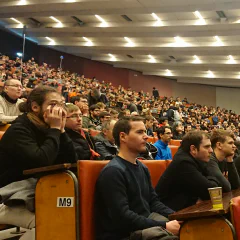
This year I managed for the first time to attend Fosdem in Brussels. Since I started to be involved in open source software I always wanted to go, but somehow something else always came up. This time I made an early effort to book my vacation days, hotel and flight. I stayed at the Bedford Hotel & Congress Center, which was the worst part of the whole trip. Just avoid it. I never been to Brussels and for some reason thought it would be a bit of a dump with an European Government ghetto attached. But it is quite the opposite, a very charming town with lots of things to do. I checked out the Atomium, House of European History, Veloseum and the Natural History Museum. There are many statues, parks and gratifies spread around the city to keep you busy. Most of the time I spend walking around the city and checking out the old buildings and cobblestone streets. I obviously also had fries and waffles. Fosdem is a pretty big conference with many parallel tracks. Because it was my first time I took the easiest path and just stayed in the main room where all the keynotes were happening. Some were more attended than others, but the room was always pretty full. Here is a list of the talks I followed, with a link to the official website, some have the videos already attached. FLOSS, the Internet and the Future https://fosdem.org/2019/schedule/event/floss_internet_future/ Blockchain: The Ethical Considerations https://fosdem.org/2019/schedule/event/blockchain_ethics/ Very much a high level talk, but presented very well and entertaining. Mattermost’s Approach to Layered Extensibility in Open Source https://fosdem.org/2019/schedule/event/mattermost_layered_extensibility/ Mostly a commercial for Mattermost, not much about layering. Matrix in the French State What happens when a government adopts open source & open standards for all its internal communication? https://fosdem.org/2019/schedule/event/matrix_french_state/ I never heard of matrix before, it looks like a very interesting project and it is cool to see it adapted by the French government. I tried it out myself, but it is still pretty buggy - at least the registration process. Solid: taking back the Web through decentralization App development as we know it will radically change https://fosdem.org/2019/schedule/event/solid_web_decentralization/ I read about this on lwn.net . To make this useful in any way it has to be widely adopted, which seems unlikely. Like the semantic web it is a developers dream, that always seems to be in the near future. The Current and Future Tor Project Updates from the Tor Project https://fosdem.org/2019/schedule/event/tor_project/ Very cool to see how Tor is moving and adapting to allow more people to enjoy privacy. Certainly got me to install the Tor Browser on my mobile and thinking about running a Tor node. Algorithmic Sovereignty and the state of community-driven open source development Is there a radical interface pedagogy for algorithmic governementality? https://fosdem.org/2019/schedule/event/algorithmic_sovereignty/ Open Source at DuckDuckGo Raising the Standard of Trust Online https://fosdem.org/2019/schedule/event/duckduckgo_open_source/ For me it still has to go a long way before it can replace Google in my daily life. But it is the default in the Tor Browser, so I’ll see how it goes. They also have some additional tools to help with privacy, which looked pretty useful. Crostini: A Linux Desktop on ChromeOS https://fosdem.org/2019/schedule/event/crostini/ An infomercial from Google. Open Source C#, .NET, and Blazor - everywhere PLUS WebAssembly https://fosdem.org/2019/schedule/event/open_source_microsoft/ I planned to use this slot to get some food, but I am glad I didn’t. Very entertaining talk about the portability of C# code all demoed live with use cases in CLI, Web, micro computer and micro controller. I just still have a deep seated mistrust in Microsoft, so I am not ready to look into C#. The Cloud is Just Another Sun https://fosdem.org/2019/schedule/event/cloud_is_another_sun/ I am worried myself of using cloud services like AWS where I am locked in to some software, but some of the services are just so convenient and cheap that it makes sense for a business. 2019 - Fifty years of Unix and Linux advances https://fosdem.org/2019/schedule/event/keynote_fifty_years_unix/ Maddog giving a very long talk about the history of Unix, it made me feel old and young at the same time.

February 8, 2019 · 4 min · Christof Damian

2012 New Year's Resolutions

It is that time of the year again where I make up stuff to ignore for the following twelve months. Last year I didn’t do it, but this year I will give it another try. I has been pointed out that these kind of resolutions doesn’t really fit into the agile way of making decisions that I do subscribe to in my professional life. I will again try to make follow up posts to check how I am doing during the year and possibly adjust the goals. So here we go. No Screen Day – don’t spend any time in front of a screen or phone for one day a week. This can’t be avoided for work, but everything else is forbidden. I am going to start with a low use day, like Tuesdays and then increase it to a day with more free time like Fridays or possibly two weekdays. Sort out Fedora – I am behind with my work on Fedora packages. This has to do with a lack of time, but also with the direction Fedora is taking, which has killed my motivation a bit. First I will catch up with all the work and then decide if I give up on maintaining the packages and switch to CentOS and let other people do the work. If I give up on Fedora there are other open source project where I could invest more time. Cook new stuff – I love cooking, but often I just rehash old recipes or do one of these “whatever is in the fridge” meals. So plan for this year: pick a new recipe every week and cook it on the weekend. Now you are probably wondering where the usual stuff is. You know, the bits about weight and sports. I see those as a given anyway. I will continue to do more mountain biking and running and eat well enough to not end on the very lardy side. I will hopefully also progress on my career without having to do major changes. As these are pretty easy goals I might add harder ones or follow Cutts example in his quest to do a new thing every month and stay with it if it turns out to be nice. btw: I shouldn’t have told you this. 

January 2, 2012 · 2 min · Christof Damian
Symfony RPM for Fedora and RHEL

Symfony RPM for Fedora and RHEL

I am a big fan of Fedora and the PHP Symfony framework. Quite early I decided that it would be nice to have Symfony packaged as a Fedora package. What I didn’t realize was how long it would take me. I submitted my Package Review Request on the 12.8.2009. One of the first comments pointed to me to an older request, which was abandoned because the packager run into some difficulties with the Fedora guidelines. But I am not a person who gives up easily, so I continued fixing the package until it got finally approved on the 19.1.2011. By now the packages for Fedora 14 and EPEL 6 are in the official repositories and you can install Symfony by installing the package php-symfony-symfony. Why did it so long? The problem are the different philosophies between Fedora and Symfony. While Fedora has a strict no bundled libraries policy, Symfony comes with a number of bundled libraries to make it easy to install. Symfony also recommends to use a separate copy for each install, which also explains the bundling of the libraries. I agree with both opinions, but I still wanted an RPM for Symfony. I think it can be useful for a few cases: if you want to create a quick project without having another copy of Symfony aroundif you have multiple websites on a machine which all run the same Symfony version and you want to save memory and manage Symfony by RPM if you want to build your own RPM, which includes your own Symfony application and you need some place to start. you start with the RPM version for a fast set-up and later convert it to a bundled symfony, which is rather easySo, what libraries does Symfony bundle? These are in the vendor directories: doctrine, phing, propel, propel-generator, lime, swiftmailer. And then there is also sfYAML. I decided to do without propel support, because I didn’t want to update the rather ancient propel RPM that already was available. I created new packages for doctrine and swiftmailer, while Remi already had sfYAML packaged for use with phpunit. So even if nobody likes having Symfony packaged, the doctrine and swiftmailer packages will be useful. At the end of the review another problem was pointed out to me. There are too many versions of Symfony floating around. You got the one you get through the symfony pear channel (which I am using), the one from the website and the sandbox. The last ones as tgz and zip files. There are no checksums for any of these, which makes it impossible to find out if I provide the correct version or if someone replaced them on the site. So, what can one learn from all of this? don’t bundle libraries. The Symfony guys are very careful to make their classes well encapsulated and independent (even more so in Symfony2), the same holds through for library dependencieseven if you don’t manage to achieve you initial goal, other good things will come out of it whatever happens, you learn new things. By now I package a number of packages for Fedora. do not give upWill I try to package Symfony2 ? Unlikely. Unless Symfony makes it easier to install the core and bundles separate and stops bundling libraries it will be another two year to package it. Though they seem to be on the right track with the Symfony components and the bundle system.

February 6, 2011 · 3 min · Christof Damian