My Workspace

My Workspace

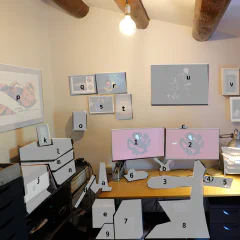
I like looking at pictures of other people's office set-ups. With most people working from home at the moment you see more and more nice workspaces especially tuned for video conferencing. I was lucky enough to have a space and a reasonable set-up already. By chance I also had ordered bits and pieces before everything was sold out on Amazon. There are a few things I still want to improve. The light is not ideal for video conferencing and I am also going to try a separate microphone for better sound. DeskMy basic desk set-up is always the same. This is the first time I have two big screens, but I always have the same keyboard, headphones and mouse. I think this goes back to at least 2000. In our currently closed office I have the same again and when I start a new job I usually bring the devices with me as not every company lets you freely choose. The computer is always running the current version of Fedora Linux, often upgraded over many years. 1. Dell Monitor U2719DC UltraSharp. I really just wanted one of these as I still had another very old monitor. This one came with a pixel error and Amazon send a replacement, but never managed to get the pick-up of the broken one sorted. So now I have two and use the one with the broken pixel for the not important stuff, like Slack. I think the broken pixel is not even a broken pixel, but an insect stuck between the layers - a real bug. 2. Dell Monitor U2719DC UltraSharp - the nice one, which has my browser, shell and Emacs. 3. Microsoft Natural Ergonomic Keyboard 4000 GB layout - while I am always looking for new fancy hacker keyboards I have stuck with this one. I have another one in storage in case this one breaks. 4. Logitech Mouse G502 Hero - my mice and keyboard are always wired, which limits choice a bit. I have pretty big hands and like a mouse that fills them. 5. Logitech Mousepad G440 - matchy-matchy with the mouse. I could do with a smaller one, because of the hight DPI of the mouse. 6. Sony Headphones MDR-1RBT - I am a bit addicted to headphones. I have three different Sony MDR-1 versions (RBT, ABT and R). I love the fit and sound. 7. PC AMD Ryzen 7 3700X, 32GB, 1TB, build up recently, also has a cheap fanless graphics card 8. Chair - from my first job/start-up, still works 9. APC BX1400U-GR Back-UPS BX, power outages and brownouts are quite common in Spain and even more so in the countryside. This protects the computer, there is another one for the routers and NAS. a. Fleximounts F6 monitor arm for laptop - it works, not a lot of movement b. Fleximounts F6D monitor arms for screens - same for two devices c. Logitech C920 HD Pro - I am lucky I ordered this in time, it works, I probably won't upgrade any time soon. The Logitech Brio is also silly expensive. SupportNot directly related to work, but supporting the main computer. d. Thinkpad T430s on a arm and T470s on the floor - laptops from work, I use them in the office and here when I need another small screen or different device. One of them also has Windows on a partition for devices that require Windows for firmware upgrades e. AmazonBasics paper shredder - goes together with the messy GTD stack on my desk, everything that I don't file goes into this one. f. Synology DS218+ - backup of the computer, Syncthing backup, all my music and films. g. USB Charging station (with Raspbery Pi running Syncthing on top), with various USB-A, micro-usb, and USB-C connectors and one for Garmin watches h. Rubbish router from provider i. AmpliFi HD Router - super simple set-up, annoyingly only with a mobile, supports multiple mesh repeaters that are all over the house j. HP OfficeJet Pro 9010 - maybe I should have gone for a laser? I don't really print a lot k. Thermometer / Barometer - it is way too hot in my office SoundI like my old school Hi-Fi components. If I had unlimited money I would just be buying this stuff on ebay the whole day. The combination of the Sony amplifier and JBL speakers gives a sound I love. The amplifier is also connected to a Chromecast Audio for multiroom sound, computer and headphones. l. Tape deck Sony TC-K790ES - needs some work, the rubber transport bands disintegrated and need replacement, which is a bit tricky m. Tuner Sony SA3ES - I never use it, but it is pretty! n. Amplifier Sony TA-542E - this must be pretty old too, still works fine o. JBL Control 1 Pro speakers - come with mounts for the wall and look sleek Art & MemoriesSince we bought the house and I have no further move is planned I made some effort to finally put all kind of stuff on the wall. p. Sven Vaeth & Paul Cooper flyer 17-7-93 Warehouse Cologne q. Photo from the Space Shuttle signed by Astronaut Robert Crippen r. family s. My dad and myself on our last holiday together. I have no idea why we shake hands. t. family u. X-Ray Cyclist by Nick Veasey sold by IKEA. Nick is one of my favourite artists and this is the cheapest way to get a great quality print. v. Newton MessagePad 130 - I really did use this back in the days. It is a bit bulky. w. Palm V, Palm Tungsten T, Ericsson t39 with extra antenna and calculator from school - this was my "smartphone" back in the days when phones got smaller every year. I sometimes connected it with bluetooth to the Palm for connectivity on the go. I miss small phones. x. random memories box: old business cards, passport, party flyer, motorcycle key y. Curves Calendar - don't google that. It has photos of mountain roads for each month to remind me of cycling. I just get a new one every year and replace it.
July 27, 2020 · 5 min · Christof Damian

Bloomsky Review Update: Much better

In September I published a review of the Bloomsky Weather Station, which I summarized with “a nice toy with brilliant hardware and rubbish software.”. My main complaint was that it was impossible to share an URL of the station and to get to the data, photos and images in any way. Today all of this has changed. Now there is a map with all the stations, and each station has it’s own URL like mine for example. It includes the current data and webcam image and last timelapse. This will already make most people happy, but they didn’t stop there. Now every user has his own private dashboard with access to previous timelapses and historical data. historical data The historical data gives you nice graphs for the available period and also has a table view with the detailed information. The feedback of the graphs can be a bit slow especially if you choose a large time span, but it does look really pretty and gives you a quick overview about the weather changes in a longer time frame. timelapses The timelapses view is straight forward, you can see a calendar with the available timelapses and you can download the one from the selected date. No bulk download yet as far as I can see. ...

December 31, 2015 · 2 min · Christof Damian
Bloomsky Review

Bloomsky Review

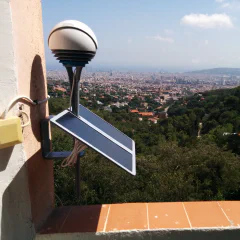
UPDATE: I posted a followup to this, with information about the new software and API and now highly recommend the Bloomsky Station The Bloomsky “Weather Camera” is a weather station with built-in camera. I first saw it on a Kickstarter Campaign, which was pretty successful. I snapped one of the early birds deals and later added a solar panel. Expected delivery was December 2014 (ha!), it turned up in August 2015. But this is already better than some other campaigns. They had some problems to get the CE approval for Europe, so that explained some of the delay. It is advertised as “5-in-1 weather station + HD camera that captures real-time weather data + sky image at your location. Next Generation Weather Network.”. ...

September 12, 2015 · 3 min · Christof Damian

Fedora 14 on a Lenovo Thinkpad T510

by Jemimus, on Flickr Another brand new toy. After my last trip to the UK for bikesoup I decided that it was about time to get a proper laptop. So far I only have a netbook, which is very convenient when size and weight matter. But for getting work done it is just to small, the main problem is the screen size and resolution. I had a look around for good full sized laptops and the only brands producing something with the quality I had in mind were Apple and Lenovo. The advantages of the Apple over Lenovo are better built quality, battery life and easy to buy locally. I choose the Lenovo, because you can order it with more gadgets, swappable batteries and mostly because it isn't an Apple as I despise where the company is going and I already had bad experiences with Linux and iPods. This is the configuration I finally got. Intel Core i7-620M 15.6" FHD Display 1920x1080 4 GB UltraNav (TrackPoint and TouchPad) with Fingerprint Reader 500 GB Hard Disk Drive, 7200rpm Intel Centrino Ultimate-N 6300 (3x3 AGN) Integrated Mobile Broadband (Gobi 2000 3G with GPS) First thing I did was to install Fedora 14 on it. I used the install option to shrink the Windows partition to 50G and used the rest for Linux. I am probably going to replace the hard-disk with a SSD in the future, but it was a bit too expensive for now. The install was amazingly boring. I was expecting all kind of problems with the hardware, but everything just worked. Even the fingerprint reader allows you to login after configuring it with a nice tool. The only tweaks I needed so far, are these: The UMTS card needs a firmware and loader, I used these instructions from the CentOS list. I don't really need it, because mobile broadband via bluetooth is also very easy to set up and works just as fast. I haven't tried the GPS yet, but I seem to be inside of buildings most of the time anyway if you enable VT-D (whatever that is) in the BIOS, hibernate / suspend to disk won't work for some reason some of the preferences don't work for the touchpad, but you can enable those and more with the synclient tool. For example "synclient VertTwoFingerScroll=1" Battery time is a bit disappointing, with either a 6 or 9 cell battery. Some of it seems to be the fault of the Linux software, but PC hardware always seems to be rubbish in that department. The build quality is also not on the level of a MacBook pro, but much better than any Dell, Asus or whatever they are called. I will comment on this post in case I make any new discoveries.

November 28, 2010 · 3 min · Christof Damian

Kindle and ebooks

I was planning to buy an ebook reader for a while. I mean it is 2010 and if we don’t have flying cars at least everyone should have a robot and not read from dead trees. It took me a while because I wasn’t able to decide on a brand and when I decided on Amazon I couldn’t decide on which Kindle to get. My girlfriend took the decision off me by giving me a Kindle 3G+Wifi for my birthday. So here is a quick review. Once you open the packaging you already notice the difference to any other display device you have ever used. The screen already shows something, even though the device is switched off. In this case it shows the instructions to switch it on and plug it in. Whenever the device is switched off it displays a random picture. The Kindle is about the size of a normal paperback novel, it is not too heavy and it is very easy to hold with one hand. The large “turn page”-button on both sides of the screen allow reading without moving your hands. With the the 3G or Wifi you can access the Amazon store, which allows you to buy books or directly download one of the many free books from Amazon. Once you try this you might notice one of the disadvantages: a lot of books are not available for European buyers, this even includes some of the free books. The free books seem mostly be from project gutenberg, so I don’t understand the reasoning for this. You can just download them from there. A lot of paper books, especially older ones are not available at all. So first thing I bought The Ultimate Hitchhiker’s Guide to the Galaxy obviously. But I know that one already, so I also bought The Last Run: A Queen & Country Novel, which is a kind of James Bond story with a British female agent and the last art of a series which I already followed. The book cost me $18.74, and there is already the first problem, I think it is too much. It does cost less for US customers and the hardcover is only $17.16. Now everyone is saying that it isn’t the paper that is making the price, but something is clearly wrong here. With an Amazon ebook I am also loosing my right to lend the book to other people or to sell it again once I read it, there should be some compensation for this. The reading experience on the other hand was very nice. I also had the feeling that I read quicker on the reader compared to a paper book, maybe because of the smaller page size or the quicker page turns. This is was the Kindle is made for, reading novels is a very nice experience. Now the bad stuff: reading pdfs or technical books on the 6" Kindle is not nice, it is just too small. The lack of colour is also a problem for these and comics. The organization of books on the Kindle sucks, there should be a view with the book covers (which are also not always provided by the books), the collection system is also rubbish. Navigation is also clumsy, a touch screen would be the obvious solution but this adds weight, size, reduces battery live and quality of the display. But even without touch this could be a lot smoother. And finally: how can Amazon with one of the best, if not the best on-line shop produce a shop on the kindle that is so useless. Unless you are not near a computer it is always easier to switch on your desktop and do the shopping on amazon.com and then send it to the Kindle. Heck, even if you are not around a computer it might be faster to take a cab to the next internet cafe and do the shopping there. To summarize: I am happy with the device for the reading I use it for. I am also glad that I don’t have carry around kilos of books the next time I read the Hitchhiker, Red/Green/Blue Mars or Lord of the Rings again. And the project gutenberg is finally useful to me too, with lots of classics and older books like the Origin of Species available for free. And in the future I will get another ereader for PDFs, technical books and comics. But only if available with a colour display in the same quality as the Kindle

November 13, 2010 · 4 min · Christof Damian