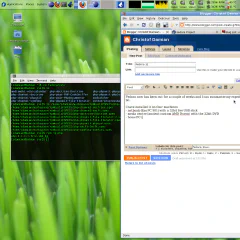
Fedora 14 on a Lenovo Thinkpad T510

by Jemimus, on Flickr Another brand new toy. After my last trip to the UK for bikesoup I decided that it was about time to get a proper laptop. So far I only have a netbook, which is very convenient when size and weight matter. But for getting work done it is just to small, the main problem is the screen size and resolution. I had a look around for good full sized laptops and the only brands producing something with the quality I had in mind were Apple and Lenovo. The advantages of the Apple over Lenovo are better built quality, battery life and easy to buy locally. I choose the Lenovo, because you can order it with more gadgets, swappable batteries and mostly because it isn't an Apple as I despise where the company is going and I already had bad experiences with Linux and iPods. This is the configuration I finally got. Intel Core i7-620M 15.6" FHD Display 1920x1080 4 GB UltraNav (TrackPoint and TouchPad) with Fingerprint Reader 500 GB Hard Disk Drive, 7200rpm Intel Centrino Ultimate-N 6300 (3x3 AGN) Integrated Mobile Broadband (Gobi 2000 3G with GPS) First thing I did was to install Fedora 14 on it. I used the install option to shrink the Windows partition to 50G and used the rest for Linux. I am probably going to replace the hard-disk with a SSD in the future, but it was a bit too expensive for now. The install was amazingly boring. I was expecting all kind of problems with the hardware, but everything just worked. Even the fingerprint reader allows you to login after configuring it with a nice tool. The only tweaks I needed so far, are these: The UMTS card needs a firmware and loader, I used these instructions from the CentOS list. I don't really need it, because mobile broadband via bluetooth is also very easy to set up and works just as fast. I haven't tried the GPS yet, but I seem to be inside of buildings most of the time anyway if you enable VT-D (whatever that is) in the BIOS, hibernate / suspend to disk won't work for some reason some of the preferences don't work for the touchpad, but you can enable those and more with the synclient tool. For example "synclient VertTwoFingerScroll=1" Battery time is a bit disappointing, with either a 6 or 9 cell battery. Some of it seems to be the fault of the Linux software, but PC hardware always seems to be rubbish in that department. The build quality is also not on the level of a MacBook pro, but much better than any Dell, Asus or whatever they are called. I will comment on this post in case I make any new discoveries.

November 28, 2010 · 3 min · Christof Damian
git workflow for the bikesoup project

git workflow for the bikesoup project

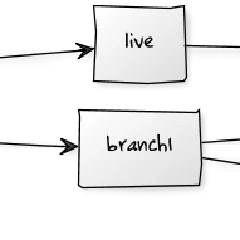
I have been one of the many converts to git and try to use it whenever possible. So far this has been mostly for smaller project, open source projects, Fedora and a little bit at work. bikesoup is my first bigger project using git. I started with initial development on the master branch and created feature branches which got merged back into master. Before going live for the first time I created a live branch. This is pretty much what you would do in subversion too, maybe with the exception of any feature branches. Once the site went live I created a feature branch off master for each issue in bugzilla I am currently working on. When I am happy with the fix I merge it back into it. And when the feature goes live it the feature branch is also merged into live. The diagram below shows this process. ...

October 2, 2010 · 3 min · Christof Damian
bikesoup

bikesoup

Yesterday one of my side projects went live: www.bikesoup.co.uk . Last December Anthony approached me about doing the site and I agreed to work on it in my free time. It took a while, but this included finding a designer ( d2tstudio ), going through the process of finding a feature set for the launch and the programming. And all of this while I started my new proper job at Softonic, which means I didn't really have as much time to invest in it as I would have liked. The site is a pretty standard e-commerce / classified ad site tailored to bicycles. But as with every project there are some special requests which makes it interesting to work on, like the payment and billing system. For me it was especially nice to do all the programming from beginning to end on my own and being able to choose the technologies I like to work with. Anthony pretty much lets me decide all the technical bits. The site is build completely on open source technologies and I might be able to give something back in the future too. CentOS for the server OS Fedora on the development machine PHP as the language MySQL database memcached symfony 1.4 as the web framework, with some plugins sfImageTransformPlugin and sfImageTransformExtraPlugin for image transformations swCombinePlugin for JavaScript and CSS optimization ioMenuPlugin for the menus ... jQuery JavaScript framework colorbox plugin for overlays dataTables for Ajax tables jcarousel for slideshows git as source control Eclipse IDE bugzilla a bug tracker The current version is just the first milestone and there is still a lot of work to do. But first I am looking forward to see if there is any interest in a site like this and what the users want from it in the future.

September 26, 2010 · 2 min · Christof Damian
Fedora 12

Fedora 12

Fedora now has been out for a few weeks and I can summarize my experience with it a bit. I have installed it on four machines: - netbook (Eee PC 901) new install with a 32bit live USB stick - media centre (ancient custom AMD Duron) upgrade with the 32bit DVD - home PC (AMD Phenom 9350e) upgrade with the 64bit DVD - work PC (Dell Intel) with 64bit preupgrade I would have preferred the preupgrade on all machines, but I am using RAID on some of the machines and preupgrade doesn’t like /root being on RAID. But the upgrade went smooth in all cases, so I don’t really mind. I also changed the graphic card in my work PC to an ATI HD3450, so I can finally use the desktop effects with an open source driver. What works out of the box Desktop effects on the netbook, home and work PC, with either the ATI card or Intel on-board graphic chips. Pulseaudio with USB or bluetooth headset. I use it mainly with Skype, which is the only non open source software left on my computers (I blame peer pressure). PHP 5.3.1 and MySQL 5.1.40, which meant I have stopped using the Remi repository for now. Automatic bug reporting for program crashes and kerneloopses. This should make the quality of future releases even better, even though bugzilla is pretty much swamped with bug reports now. But I think it is always better to have more information than less. CPU speed scaling finally works. I had to fiddle with the BIOS settings a bit to enable Cool and Quite and some other power management settings. What doesn’t (or didn’t work) I had some problems with pulseaudio crashing after installing the ATI card, but putting a “blacklist snd-hda-codec-atihdmi” into /etc/modprobe.d/blacklist.conf fixed it. I found the fix on bugzilla. I am still not able to play my Homeworld 2 CD with either Wine or VirtualBox, I think the drivers are still not good enough to support the OpenGL needed for the game. It also crashes after a while in VirtualBox. Radeon bugs currently hold the top spot at kerneloops, which makes a fix more likely. If you use an Eclipse (or Azureus), which didn’t come with Fedora some of the GUI buttons don’t work. This is caused by a change in GTK and a workaround is to set GDK_NATIVE_WINDOWS=true before you start eclipse. This is also mentioned in bug 540956. I bought a D-Link DWA-547 Wireless N PCI Card for the media centre in my effort to upgrade the flat to 802.11n, which I just can’t get to work. It is either slow or crashes the whole machine without any way to get to the kerneloops. I probably have to find a different card to get it working. But wireless cards always have been a problem. My Bit I am also trying to contribute more to fedora by building packages and doing package reviews. After the Barcelona PHP Conference I decided to build RPMs for the PHP QA packages by Sebastian Bergmann and others. Turns out that most of them are already available or up for review, so I applied as co-maintainer and did a package review. Remi has a good overview of PEAR packages in Fedora. The other big project which will probably take a few more years is the odyssey of packaging symfony, this turns out to be difficult because symfony bundles a lot of libraries and they need to be separated into their own packages. The good thing is that this will bring these libraries into Fedora (and eventually EPEL) too. So far I managed to get Doctrine in and the Swift Mailer is up for review. Symfony itself won’t get into EPEL, because it requires a newer PHP, but it will work with the Remi bits. You can find a list of my packages in the Fedora package DB and also of the ones I co-maintain. Still rather short list at the moment :-) Summary Probably the best Fedora upgrade and usage experience I had so far. The main problem is still the hardware, the software itself works perfectly and for my usage I don’t really need anything more at the moment. Finally a rather boring screen shot of my desktop:

December 19, 2009 · 4 min · Christof Damian

more server tuning

In my quest to try out new things and make my rented virtual server run a bit smoother I tried two (for me) new tools: memcached: I never had a need to use it, because at work we just do websites which nobody looks at. We could really have used this at guideguide, where we basically used mysql to cache some often used data which didn’t work too well. Installation was very easy on CentOS and mediawiki and Django have direct support for memcached. I just had to enable it and change the code for api.bicingwatch.com to make use of the cache. lighttpd: On the previous krass.com server, which had about ten times more memory I used two apache instances. One for the static stuff and as reverse proxy for the second one for the mod_perl server. Now I am using lighttpd for the static and reverse proxy. I am not 100% convinced by the syntax, but it is rather easy to setup and allows some refactoring of the config with include files. So for example I have in the main config: $HTTP[“host”] == “api.bicingwatch.com” { server.name = “api.bicingwatch.com” server.document-root = “/……/bicingwatch/site_media” include “proxy-localhost.conf” } And in proxy-localhost.conf $HTTP[“url”] !~ “.(js|css|gif|jpg|png|ico|txt|swf|html|htm)$” { setenv.add-response-header = ( “X-Forwarded-Host” => server.name ) proxy.server = ( "" => ( ( “host” => “127.0.0.1”, “port” => 8000 ) ) ) } And on port 8000 is the apache and mod_python installation I had before. Seems to work ok, so that is another thing gone from my todo list.

December 13, 2008 · 2 min · Christof Damian