My Workspace

My Workspace

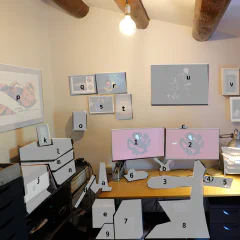
I like looking at pictures of other people's office set-ups. With most people working from home at the moment you see more and more nice workspaces especially tuned for video conferencing. I was lucky enough to have a space and a reasonable set-up already. By chance I also had ordered bits and pieces before everything was sold out on Amazon. There are a few things I still want to improve. The light is not ideal for video conferencing and I am also going to try a separate microphone for better sound. DeskMy basic desk set-up is always the same. This is the first time I have two big screens, but I always have the same keyboard, headphones and mouse. I think this goes back to at least 2000. In our currently closed office I have the same again and when I start a new job I usually bring the devices with me as not every company lets you freely choose. The computer is always running the current version of Fedora Linux, often upgraded over many years. 1. Dell Monitor U2719DC UltraSharp. I really just wanted one of these as I still had another very old monitor. This one came with a pixel error and Amazon send a replacement, but never managed to get the pick-up of the broken one sorted. So now I have two and use the one with the broken pixel for the not important stuff, like Slack. I think the broken pixel is not even a broken pixel, but an insect stuck between the layers - a real bug. 2. Dell Monitor U2719DC UltraSharp - the nice one, which has my browser, shell and Emacs. 3. Microsoft Natural Ergonomic Keyboard 4000 GB layout - while I am always looking for new fancy hacker keyboards I have stuck with this one. I have another one in storage in case this one breaks. 4. Logitech Mouse G502 Hero - my mice and keyboard are always wired, which limits choice a bit. I have pretty big hands and like a mouse that fills them. 5. Logitech Mousepad G440 - matchy-matchy with the mouse. I could do with a smaller one, because of the hight DPI of the mouse. 6. Sony Headphones MDR-1RBT - I am a bit addicted to headphones. I have three different Sony MDR-1 versions (RBT, ABT and R). I love the fit and sound. 7. PC AMD Ryzen 7 3700X, 32GB, 1TB, build up recently, also has a cheap fanless graphics card 8. Chair - from my first job/start-up, still works 9. APC BX1400U-GR Back-UPS BX, power outages and brownouts are quite common in Spain and even more so in the countryside. This protects the computer, there is another one for the routers and NAS. a. Fleximounts F6 monitor arm for laptop - it works, not a lot of movement b. Fleximounts F6D monitor arms for screens - same for two devices c. Logitech C920 HD Pro - I am lucky I ordered this in time, it works, I probably won't upgrade any time soon. The Logitech Brio is also silly expensive. SupportNot directly related to work, but supporting the main computer. d. Thinkpad T430s on a arm and T470s on the floor - laptops from work, I use them in the office and here when I need another small screen or different device. One of them also has Windows on a partition for devices that require Windows for firmware upgrades e. AmazonBasics paper shredder - goes together with the messy GTD stack on my desk, everything that I don't file goes into this one. f. Synology DS218+ - backup of the computer, Syncthing backup, all my music and films. g. USB Charging station (with Raspbery Pi running Syncthing on top), with various USB-A, micro-usb, and USB-C connectors and one for Garmin watches h. Rubbish router from provider i. AmpliFi HD Router - super simple set-up, annoyingly only with a mobile, supports multiple mesh repeaters that are all over the house j. HP OfficeJet Pro 9010 - maybe I should have gone for a laser? I don't really print a lot k. Thermometer / Barometer - it is way too hot in my office SoundI like my old school Hi-Fi components. If I had unlimited money I would just be buying this stuff on ebay the whole day. The combination of the Sony amplifier and JBL speakers gives a sound I love. The amplifier is also connected to a Chromecast Audio for multiroom sound, computer and headphones. l. Tape deck Sony TC-K790ES - needs some work, the rubber transport bands disintegrated and need replacement, which is a bit tricky m. Tuner Sony SA3ES - I never use it, but it is pretty! n. Amplifier Sony TA-542E - this must be pretty old too, still works fine o. JBL Control 1 Pro speakers - come with mounts for the wall and look sleek Art & MemoriesSince we bought the house and I have no further move is planned I made some effort to finally put all kind of stuff on the wall. p. Sven Vaeth & Paul Cooper flyer 17-7-93 Warehouse Cologne q. Photo from the Space Shuttle signed by Astronaut Robert Crippen r. family s. My dad and myself on our last holiday together. I have no idea why we shake hands. t. family u. X-Ray Cyclist by Nick Veasey sold by IKEA. Nick is one of my favourite artists and this is the cheapest way to get a great quality print. v. Newton MessagePad 130 - I really did use this back in the days. It is a bit bulky. w. Palm V, Palm Tungsten T, Ericsson t39 with extra antenna and calculator from school - this was my "smartphone" back in the days when phones got smaller every year. I sometimes connected it with bluetooth to the Palm for connectivity on the go. I miss small phones. x. random memories box: old business cards, passport, party flyer, motorcycle key y. Curves Calendar - don't google that. It has photos of mountain roads for each month to remind me of cycling. I just get a new one every year and replace it.
July 27, 2020 · 5 min · Christof Damian
Frankenscrumcycle

Frankenscrumcycle

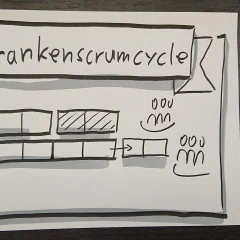
Originally posted on the Devex Tech Blog. Frankenscrumcyle presentation slide At Devex we try to optimise every aspect of our work and at times try radical new things. In this post I describe one of these journeys, that led us from Scrum, to Six Week Cycles, to Frankenscrumcyle and a possible future. Scrum In the product team at Devex we used a pretty standard Scrum process for about four years. In the beginning with one team in Manila and one in Barcelona and later with one or two teams just in Barcelona. As it is the case for most companies this wasn’t a 100% out of the book Scrum, but slightly adapted to our needs. We always had one week sprints, with Demo and Retrospective on Fridays. Grooming on Thursday and a daily stand-up meeting. Everything managed with Jira. It was going pretty well, but there were certainly some aspects we were not quite happy with. Pros Very flexible in adjusting work to requirements Easier team / resource allocation, we can pull the things from the backlog which fit the available team Communication is encouraged through various meetings It is widely used and very easy to find help and information Transparent by relying on Jira and communication We had some tech backlog management, even if it wasn’t perfect Cons Too many meeting with everyone, even if they are not relevant to all Jumping between tasks as there tended to be a lot of unrelated issues in each sprint Bigger teams, which also didn’t always work on the same project Micro management through detailed Jira issues and easy access to the work in progress No fixed scope for a project, it is easy to add yet another sprint to a project as you can always find another feature to add Not dotting the i’s for a project, even though the project took forever we never had a chance to give it a final polish and to fix small bugs we had left over Difficult to fit in tech tasks as features always seem to trump tech backlog No space between projects to regroup, you always feel rushed Jumping between projects for some people, as you would be assigned depending on requirements Six Week Cycle At some point some people suggested trying something created, used and advocated by Basecamp called here the Six Week Cycle. You can read up on it their posts, but the basic idea is that you have a focused work of six weeks for one project (or a collection of smaller ones). The six weeks are chosen to limit the scope (“there’s a great six week version of nearly everything”) and to allow a time without distractions from other projects. Between cycles there is a time to regroup, clean up and plan the next cycle. Teams are relatively small with up to four members improving in-team communication. We gave this a go for nearly six months and saw some advantages, but already run into problems relatively early on. Pros Scope limit, because there is a fixed amount of time we have to reduce the scope to release something Buffer week, a time to regroup and plan for the future in between projects Enough time to also work on the technical side of projects and not just user facing features Deeper understanding of product by developers, because they are bound to one project for the cycle and often had direct contact with stakeholders Smaller teams, compared to the multifunctional scrum teams Autonomy / self organization to be flexible in planning order of tasks Fast in team communication, due to the smaller team Less context switching as there is always just one project per person Less irrelevant meetings, this is mostly about the grooming and whole team kickoffs More direct contact with relevant stakeholders Time to consider in between projects Less reactive as the scope should be predefined and the cycles are too long to quickly change Cons Fixed six week length of cycles doesn’t always fit the projects Short three weeks cycles, which er also tried, had a very high ramping up/down overhead, compared to working time The buffer week was not always used for the intended purpose, the project continued into it and planning moved into the cycle. A problem with reducing the scope. Team composition dictated the solution, instead of the opposite Not flexible enough to adjust to projects, team or changes Lack of communication and transparency between teams and to the outside (infrastructure, QA, planning, … ) Not widely used and difficult to find documentation or experiences from others Some confusion about where to fit tech tasks into the cycles Progress during the cycle was not very transparent Frankenscrumcycle I have to confess that I was not happy with the Six Week Cycle idea from the start. But I was willing to give it a go, because I saw problems with our Scrum and was hoping to at least learn from the experience. One problem was the lack of information about the whole idea. In the beginning there were only two blog posts by Basecamp themselves and then a few others who also gave it a go. Beginning of this year Basecamp released a series of YouTube videos with more insight. One interesting insight is that they just use it for two teams themselves, all other teams are organised in a different way. In the end I decided that we had to change again and I had to convince the team that this new way is better, even if it won’t be perfect either. It needed a name to sell it, so I made up Frankescrumcycle, because it takes ideas from the Six Week Cycles and Scrum. In reality it is mostly Scrum, but with some hard rules to avoid some of the problems we previously had. Fully epic based Each team is going to work only on one epic per sprint, to allow focusing on the work and context switching. This is a takeaway from the cycles and also allows deep diving into each project and involvement with stakeholders. Team size will depend on the projects, but should be two to four developers. Epics from one to three sprints Depending on a rough estimation and how much value an epic brings we can decide on the length of each epic. This takes the idea of limiting scope from cycles and avoids the never ending epics of Scrum. This also includes some planning and ramping down at the end of the epic, closing all the remaining issues and tech tasks for this epic. The different lengths are allowing a bit more flexibility for different sized projects or value. Optional epic extension Each epic can be extended by one sprint and only one sprint. If the team, together with product owner and stakeholders decided that an extension is necessary an epic can be extended by one sprint. Sprints are now two weeks and this makes extending expensive option, so it shouldn’t be the standard option for an epic. Bug / tech tasks / stakeholder request sprints As with the current small batch team, we are going to have some sprints which are just issue based. We can work on our smaller tasks and bugs that pile up when we are focusing on the epics. These should also be scheduled between product owners and stakeholders (including technology stakeholders). One epic = one slack channel For each epic we are going to have one slack channel, which will be closed at the end of the epic. No issue estimation and grooming At least for now. We are going to watch the number of stories instead. I checked historical sprint data and story points and issue number burndown charts behave pretty much the same. Each epic team has to figure out how to best organize their stories to fit them in the time decided on. Something we are picking up from the #NoEstimates movement, which really is a no time/story point movement. You are still estimating the size of stories and split them up in reasonable chunks. One board with epic filters For now we are just going to use one Jira board and project and will add or remove filters for epics, whenever we start a new one. This also means that everyone would use stories to make it possible for others to see what is going on and for QA and infrastructure to see what is being launched or needs testing. During the Six Week Cycle experiment some teams decided to use Google Docs to organise their work, which made it really hard to find out about the status of the different projects. #Ping channel Instead of daily stand-ups we are going to have a slack channel with a daily reminder. (spoiler: this is not really used) This is just to post blockers or information that might be relevant to other teams. For status updates we have the Jira board. The Future We have been running with this for a while now and it improved some of the problems we had seen previously. But some things didn’t work as planned. We are having too many Small Batch sprints to accommodate the many requests from different stakeholders. This kind of brings us back to jumping between tasks and random backlog of Scrum. The #Ping channel doesn’t work. It is no replacement for an in person or even hangout stand-up. This won’t scale in the future. Our team is growing and managing four epic teams at the same time is borderline, five or six is going to be impractical. Managing this all on one Jira board is also cumbersome. Constantly forming new teams is also confusing and teams don’t really gel. The often cited “forming, storming, norming, performing” doesn’t happen in a meaningful way and will get harder the larger the team becomes. One of the problems we have at Devex is the number of different products. It makes it difficult to form product teams with the number of developers we have. Until now we always had project teams that reformed after projects, with all the problems this brings. It would be nice though to move in the direction of product teams to align the teams with the company goals and avoid a lot of the context switching not only from the developers, but also the product owners and even stakeholders. More on this in the future …

August 20, 2018 · 9 min · Christof Damian

How to balance technical and business needs - Video Interview

Steven from Drive To Improve interviewed me and Fernando Palomo about balancing technical and business needs of a company. Steven did a very good job and made it did feel much shorter than it was. Good to see Fernando again too, working with him at Splendia was brilliant. Excuse my English and hair.

August 18, 2018 · 1 min · Christof Damian
Moving on...

Moving on...

I have confess that this was shorter than I would have thought or wished for, but Thursday is my last day at Splendia. Splendia is a very different company from my previous employer Softonic. While Softonic has all the perks and advantages of a big successful company with a large development team. Splendia is much smaller and when I arrived the whole team had just arrived too and was confronted with a "legacy" code base. The amount we managed to do in this year is just amazing and this wouldn't have been possible without the brilliant team. Fernando (the CTO when I started), recruited very well and made everyone fit in right away. We changed everything, from introducing scrum sprints, going from zero to 3000 unit tests, re-factoring big parts of the system, continuous integration, functional testing and everything else you expect from a modern Internet company. I gave a talk at WeLovePHP last weekend, which talked about all of this. I leave because of changes in the structure of the company and because I have the opportunity to join an exciting new project. More about this when I have started...

July 17, 2013 · 1 min · Christof Damian

WeLovePHP Talk: Methodologies and tools used by the Splendia development team

Today I gave a talk at WeLovePHP, which is a quarterly talk and workshop series organized by Softonic in Barcelona. They also do one about JavaScript. I can highly recommend them if you are interested in PHP, JavaScript or related topics. I talked about the processes and tools we are using at Splendia. There are no pictures in the slides … sorry.

July 13, 2013 · 1 min · Christof Damian